GitHub Account Cleanup: Audit, Archive & Remove Stale Repos
My end of year project is a GitHub account repository-cleanup tool to provide safe, repeatable auditing and cleanup for my GitHub accounts. I also wanted to create a catalog of my active repos. This repo focuses on repository-level cleanup (archive/delete/catalog), but the same audit run can help you discover candidates for cloud-resource reclamation and CI/workflow maintenance.
When to use this project
- Periodic account maintenance (end-of-year or scheduled audits).
- Before publishing a portfolio or transferring repositories.
- When you want a reproducible audit with a dry-run-first approach.
Functionality included in GitHub account cleanup
My TypeScript project cleans up my account in the following way:
- Archive stale repositories,
- Detect and delete empty repositories,
- Remove forks,
- Generate repo descriptions and topics with LLM and update repos with that info,
- Generate a catalog of active repos for publishing.
High level architecture
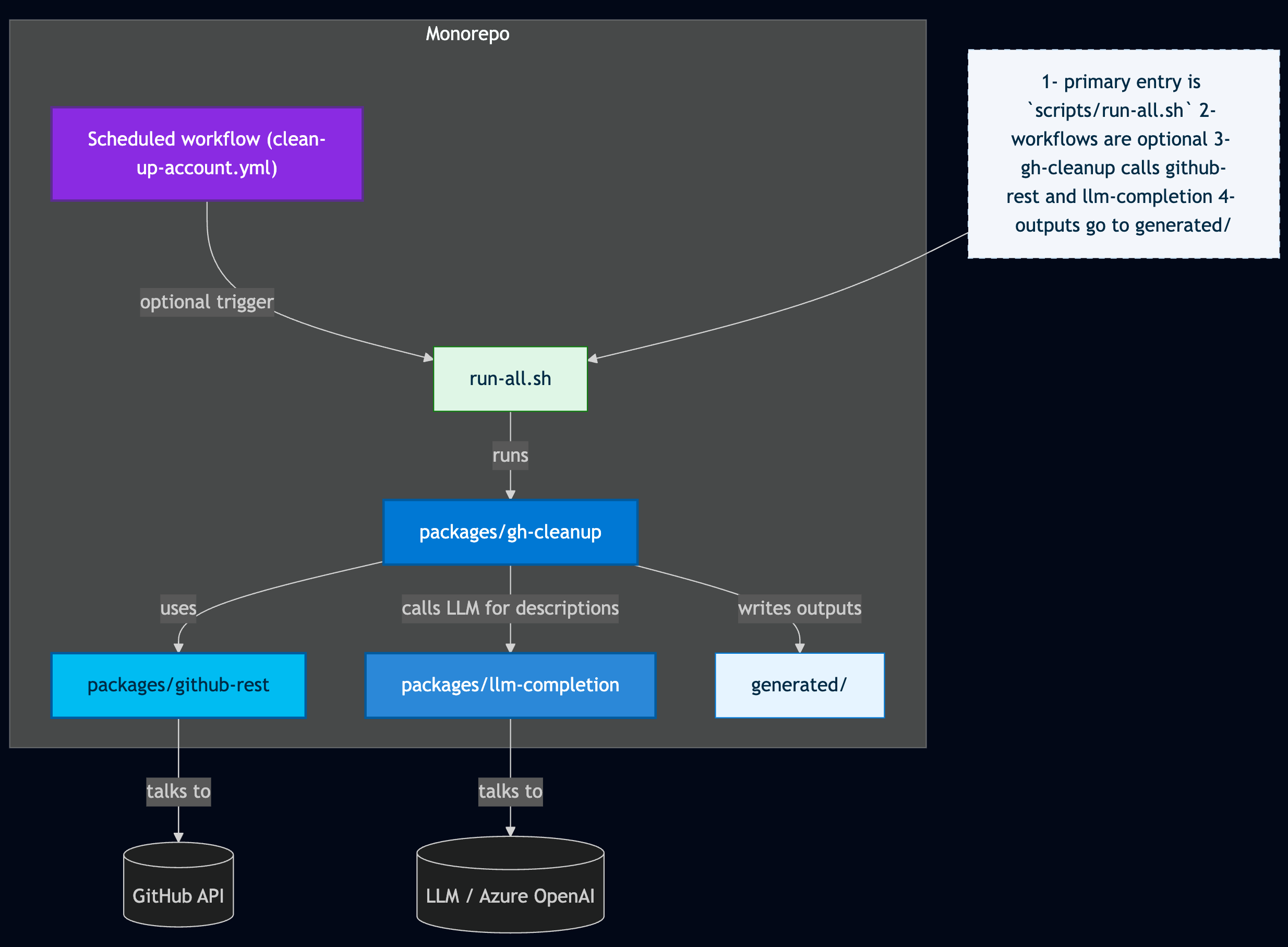
The high-level architecture of the npm workspace monorepo:
packages/gh-cleanup— CLI commands and orchestration: categorization rules, scoring, reporting, and the runner that coordinates dry-run and apply flows.packages/github-rest— GitHub REST helpers, typed endpoint wrappers, and shared network utilities.packages/llm-completion— LLM/AI utilities: prompt helpers, request wrappers, retries, and response sanitization used by the describe step.generated/— Example outputs created by dry-run executions:catalog.md,active.json,descriptions.json, summaries, etc..github- Workflows and prompt files.scripts- Top level script to clean up GitHub account, also used by
Prerequisites
This repo can be opened with Codespaces or locally with .devcontainer/devcontainer.json. The development container has all the developer setup for this project including Node.js. Once you have the repo open with the environment, create a GitHub token and an OpenAI key and an LLM model. Set these values in the root level .env.
- A GitHub token in
GH_TOKEN(classic PAT withreposcopes;delete_repoonly required for destructive operations such as deleting a repo.) - OpenAI key for LLM generation of repo descriptions and topics and an LLM model. I used 4.1-mini from Azure OpenAI.
GH_TOKEN=
GH_USER=YOUR_GITHUB_USER_ACCOUNT
OPENAI_API_KEY=
OPENAI_ENDPOINT=https://RESOURCE-NAME.openai.azure.com/openai/deployments/MODEL_NAME/chat/completions?api-version=API_VERSION
OPENAI_MODEL=gpt-4.1-mini
OPENAI_TEMPERATURE=0.2
Install and build dependencies
The root package.json uses npm workspaces to control and access all the packages in ./packages. Use the root package.json scripts to install and build the tool.
npm install
npm run build
Try out the tool
One-line run examples
-
Remove forks (dry-run):
npm run start -w gh-cleanup -- remove-forks -
Archive stale repos older than a year (dry-run):
npm run start -w gh-cleanup -- archive-stale-repos -
Delete empty repos, no PRs, no commits, size is 0 KB (dry-run):
npm run start -w gh-cleanup -- delete-empty-repos -
Categorize repos (fetch languages + README, output Markdown):
npm run start -w gh-cleanup -- categorize-repos --fetch --output=md --out=generated/catalog.md -
Summary (write
generated/summary.md):This creates the final active list of repos in a markdown table. I'll use this in my dfberry.github.io website to find projects with specific code, configuration, or CI.
npm run start -w gh-cleanup -- summary --summary-out=generated/summary.md
Full run
Once you understand what the tool does, use the ./scripts/run-all.sh to clean up your GitHub account. I used my personal dfberry account to test while building. Now that it is complete, I'll use it on my work diberry account for Microsoft.
npm run run-all:apply
The apply means empty repos are deleted and active repos are updated for description and topics.
AI-assisted development
I use AI tools (Copilot, Ask/Plan/Agent) to speed development while keeping human oversight. I commit frequently and review AI suggestions line-by-line. Choose models and session types (local, background, cloud) deliberately to control cost and behavior. Never let AI run unattended on critical changes—use dry runs and manual tests. I scaffold the repo, add features incrementally, and document decisions so I can return later. Copilot helps with comments and diagrams, but I always review and adjust its output.
Next steps
Cleanup goes beyond removing unused repositories. When tidying a personal or org GitHub account you may also:
- Reclaim unused cloud resources referenced by projects (e.g., old deployments, test clusters, or storage buckets).
- Remove or archive unused repositories that are forks, abandoned, or no longer relevant.
- Find and fix failing or stale GitHub Actions workflows (update action versions or workflow syntax) or remove workflows that are no longer useful.
- Update CI matrices and runtimes (programming language versions, OS matrix entries) to reduce CI cost and avoid testing very-old combinations.
- Bump pinned GitHub Action versions and dependencies to address deprecations and security fixes.