2 posts tagged with "copilot"

View All Tags

Portable Personal Context Across AI Client Surfaces

· 16 min read

Many developers use multiple AI surfaces daily: GitHub Copilot in VS Code, Copilot CLI, Microsoft 365 Copilot, Microsoft Scout, Claude, ChatGPT, or Cursor.

The problem: each surface starts without the context you gave the last one. Preferences, current work, boundaries, and decisions stay trapped in whichever tool you told.

This post proposes a portable personal context source: structured markdown files in a GitHub repo that AI tools can read. No vendor supports this end-to-end today. The storage can be portable; the behavior is not automatic. Each surface still needs its own wiring.


The Problem: Context Islands

Context islands diagram showing isolated AI surfaces

SurfaceWhat it knows about youWhere that knowledge lives
Copilot in VS Code.github/copilot-instructions.md in current repoPer-repo, per-machine
Copilot CLILocal instructions, skills, plugins, MCP servers, and session dataCLI-specific local state
Microsoft 365 CopilotYour M365 Graph data (emails, calendar)Cloud, not exportable
Microsoft ScoutMemories, preferences, profileLocal app state
ClaudeCLAUDE.md per project, memoryPer-project file + cloud memory
CursorProject Rules in .cursor/rules/*.mdc, plus AGENTS.md supportPer-project rules

The pattern: each tool has its own user-context format. The result:

  • Repeated preferences in every tool ("I prefer concise output," "use TypeScript," "don't auto-push to main")
  • Decisions invisible outside the surface where they happened
  • Expertise and boundaries known only where you stated them

You Already Know What the Solution Feels Like

Personalization features exist in every tool but are locked to that tool

Built-in FeatureWhat it doesThe problem
M365 Copilot: Custom instructions"Be concise, use tables"Doesn't reach VS Code or CLI
M365 Copilot: Work profileYour role, org, skillsLocked in Microsoft Graph
M365 Copilot: Saved memoriesFacts remembered between sessionsOnly M365 Copilot sees them
ChatGPT: MemoryAuto-extracted facts about youOnly ChatGPT sees them
Claude: CLAUDE.mdPer-project instructionsOnly Claude Code sees them
Cursor: RulesCoding preferencesOnly Cursor sees them

Each tool stores personalization separately. Portable context makes the source shared:

Today:
M365 Copilot → knows you like concise output
VS Code Copilot → doesn't know (asks again)
Copilot CLI → doesn't know (asks again)
Scout → has its own separate copy
Claude → has its own separate copy

With portable personal context:
Wired surfaces → read from the same source → load your preferences

Why Not Just Use Those Existing Features?

Built-in PersonalizationPortable Context
PortabilityOne surface onlyShared source; manual wiring per surface
TransparencyOpaque ("View work data")Human-readable markdown
ExportabilityCan't exportgit clone anywhere
VersioningNo historyFull git history
ControlPlatform decides formatYou decide format
DecisionsNo structured logAppend-only ledger
Auto-extractionYes (convenient)Manual (precise)

Use built-in personalization where it exists; keep portable context as the canonical source you can inspect and version.


Why Not CLAUDE.md, copilot-instructions, or Cursor Rules?

Those files are instructions TO the AI for one project. Personal context is information ABOUT you across tools. Cursor's current model is Project Rules in .cursor/rules/*.mdc; .cursorrules is legacy.

Scope comparison showing per-tool files as narrow vs personal context as universal

.github/copilot-instructions.md  → "In this repo, use ESM imports"
personal-context/process/... → "I always prefer ESM over CommonJS"

Repo-level files govern a codebase. Personal context governs how to work with you.


Why Not Just an Agent or Skill?

Agents and skills are task-scoped. Personal context is user-scoped.

Persona hierarchy showing person above process above skills above agents

Personal ContextAgent (agent.md)Skill (SKILL.md)
Answers"Who is this person?""How should I behave?""How do I do this task?"
ScopeEverything you doOne role or surfaceOne repeatable procedure
LifespanYears (grows with you)Months (evolves with tooling)Weeks (refined per use)
PortabilityShared source across wired surfacesOne surfaceSome surfaces

Personal context should feed agents and skills, not duplicate them. Without it, agents start without your quality bar, boundaries, or past decisions.


Why Not Mem0 or a Cloud Memory Service?

Mem0 is a cloud API for persistent AI memory. It makes different tradeoffs:

Mem0 (Cloud)Personal Context Repo
ArchitectureHosted API serviceLocal-first (files in git)
Data ownershipThird-party hostedYou own it (your GitHub)
Works offlineNoYes
Vendor dependencyYes (Mem0 API key)No (just git)
Human-readableNo (vector store)Yes (markdown you can edit)
VersionedNo (mutable state)Yes (git history + blame)
Semantic searchYes (their strength)No (not needed at personal scale)
Best forApp builders serving many usersIndividual developers across their own tools

For one developer, dozens of curated facts, decisions, and preferences may not need a hosted dependency.


Personal Context Is Not Memory

Context vs Memory promotion pipeline

Key distinction: personal context is not memory. They overlap, but they need different storage, governance, and precedence rules.

Context is declared, curated, and authoritative. Memory is accumulated from use.

Personal ContextMemory
OriginAuthored intentionallyAccumulated automatically
NatureCurated / declaredAccreted / observed
AuthorityAuthoritative ("this is the rule")Evidentiary ("this is what happened")
Example"My branch naming convention is {type}/{id}-{slug}""Last Tuesday you renamed a branch to wip-2"
VolumeSmall, deliberate (~50-150 facts)High-volume, ever-growing
GovernanceHuman-reviewedAuto-captured

They are two ends of a promotion pipeline:

observation  →  candidate  →  [ratification gate]  →  context
(memory) (proposed) (a human decision) (canonical)

Memory is the raw feed. Context is the reviewed output. The ratification gate is the control point. The architecture changes:

  • Stores. Memory wants a high-volume append log. Context wants a small, curated, versioned set.
  • Precedence. Context outranks memory. A remembered exception does not override a stated boundary.
  • Retrieval and governance. Context is load-always instruction; memory is search-when-relevant evidence.

This post is about context, not memory: authored, reviewed, and portable.


The Insight: LLMs Already Speak Markdown

Markdown plus GitHub enables cross-tool portability

AI tools read files. LLMs understand markdown. Developer tools commonly authenticate with GitHub.

A private GitHub repo with structured markdown files can be the shared context source.

Any surface that can read the repo can load the same context.


The Architecture: Personal Context as a Repo

Architecture diagram showing canonical repo feeding multiple surfaces

github.com/<yourname>/personal-context  (placeholder private repo)

├── context.json ← Manifest: what's here + retrieval rules

├── core/ ← RARELY CHANGES (your "constitution")
│ ├── expertise.md # What you know, your domain authority
│ ├── boundaries.md # What stays human, what AI never does alone
│ ├── role.md # Job, scope, organization
│ └── communication.md # How you prefer to interact

├── decisions/ ← APPEND-ONLY (your "ledger")
│ ├── _active.md # Decisions still governing current work
│ ├── 2026-07.md # This month's new decisions
│ └── ...

├── process/ ← STABLE (your "playbook")
│ ├── content-workflow.md # How you create content
│ ├── code-workflow.md # How you write and ship code
│ ├── quality-bar.md # Definition of done per work type
│ └── tool-preferences.md # Preferred tools and patterns

├── active/ ← CHANGES OFTEN (your "whiteboard")
│ ├── projects.md # Current active projects
│ ├── sprint-focus.md # This sprint's commitments
│ └── parking-lot.md # Deferred items

└── .github/
└── copilot-instructions.md # Tells Copilot how to USE this repo

Why Four Layers?

Separate by durability: how often it changes and who can change it.

Four layers diagram showing durability spectrum

LayerHalf-lifeMutabilityExample
CoreMonths/yearsHuman-only"I'm a senior developer on the Azure SDK docs team"
DecisionsPermanent (append-only)Any surface proposes; append after human confirmation"Use generation pipeline for MCP namespace files"
ProcessWeeks/monthsPropose via PR"Branch naming: {type}/{id}-{slug}"
ActiveDays/weeksAny surface updates after pull-before-push"Sprint focus: Ship auth-flow feature"

What Goes in Each Layer

Core: Your Constitution

Rarely changing context: expertise, boundaries, communication preferences.

core/expertise.md — What you know:

## Domain Expertise
- Azure SDK documentation across JavaScript, Python, .NET, Java, Go, Rust
- AI developer tools (MCP servers, AI Toolkit, Copilot extensions)
- Content workflow automation and multi-agent orchestration
- Technical writing for developer audiences

## Not My Expertise (don't assume I know)
- Kubernetes operations / cluster management
- Frontend framework internals (React, Vue, etc.)
- ML model training / fine-tuning

core/boundaries.md — What stays human:

## What AI Should Never Do Autonomously
- Push code to upstream repositories (only to forks)
- Send emails, Teams messages, or any outbound communication
- Close or resolve work items without my confirmation
- Delete files, branches, or repos
- Make irreversible changes without showing me the plan first

## What AI Can Do Without Asking
- Read files, search code, explore repos
- Draft content for my review
- Run tests, linting, builds
- Create branches on my fork
- Propose edits (but not commit without confirmation)

Decisions: Your Ledger

Decisions can be proposed from any surface so settled questions stay settled after review.

decisions/_active.md — Still-relevant decisions:

### [2026-07-06] Branch naming convention
- **Context:** Inconsistent branch names across repos
- **Decision:** Always use `{type}/{work-item-id}-{brief-slug}`
- **Types:** feat, fix, docs, refactor, test

### [2026-06-15] Prefer tables over prose for comparisons
- **Context:** AI kept writing long paragraphs comparing options
- **Decision:** When comparing 3+ options, always use a table
- **Supersedes:** Nothing (new preference)

### [2026-05-28] No hand-written namespace files
- **Context:** Generated files were higher quality than hand-written
- **Decision:** All namespace articles must come from the generation pipeline
- **Implications:** Slower to ship, but deterministically correct

Process: Your Playbook

Work preferences. Update as workflow changes.

process/quality-bar.md:

## When Is a Pull Request Done?
- [ ] Work item linked with "Fixes AB#{id}"
- [ ] Meaningful title and description (not just commit messages)
- [ ] No unrelated changes (surgical edits only)
- [ ] CI passes
- [ ] Review comments addressed, not dismissed
- [ ] Staged preview links included for doc changes

## When Is an Article Done?
- [ ] Technically accurate (verified against product behavior)
- [ ] Code samples run without modification
- [ ] All links resolve (no 404s)
- [ ] Metadata correct (ms.topic, ms.date, ms.service)
- [ ] Reviewed by at least 1 peer

Active: Your Whiteboard

Current work state, writable by any surface.

active/sprint-focus.md:

## Sprint 14 (2026-07-01 → 2026-07-12)

### Committed
1. Ship MCP auth namespace docs (AB#4521)
2. Review 3 community PRs on azure-dev-docs
3. Update AI Toolkit quickstart for v0.9

### Stretch
- Prototype portable context layer (this project!)

How Surfaces Consume It

Selective Retrieval: Only Load What's Relevant

Do not load the whole repo. Use context.json to choose task-relevant files:

1. Read context.json (< 1KB, always cached)
2. ALWAYS load: core/boundaries.md + core/communication.md (~400 words)
3. Classify the current task → match to load_by_task
4. Load those 2-3 files (~500 words)
5. Load decisions/_active.md (~300 words)

Total: ~1,200 words ≈ 1,600 tokens

Retrieval flow diagram

The Priority Stack

Resolve contradictions deterministically:

core/boundaries.md          ← ALWAYS wins. Non-negotiable.
decisions/_active.md ← Settled questions. Don't re-ask.
process/*.md ← How to do things. Follow unless overridden in-session.
active/*.md ← Informational state. Not authoritative.

Priority stack diagram

Threat Model: Retrieval Is the Boundary

The primary risk is prompt injection causing a surface to retrieve or reveal context it should not have. Trust tiers must be enforced before retrieval, by deciding what files or slices enter the prompt. Output scanning is not a security boundary; use it only as defense in depth. Keep two boundary files if needed: shareable operating rules that most tools can load, and private sensitive constraints that only trusted surfaces can retrieve.

Writing Back: Closing the Loop

After human confirmation, any surface can write decisions back:

# After making a decision in any surface:
cd ~/personal-context
echo "
### [$(date +%Y-%m-%d)] {decision title}
- **Context:** {why this came up}
- **Decision:** {what was decided}
- **Implications:** {what this means going forward}
" >> decisions/_active.md

git add decisions/_active.md
git commit -m "decision: {brief title}"
git push

That simple append is safe only for a single writer with a fresh clone. Multi-surface writes need write intents with IDs and timestamps, pull-before-push, and PR-based reconciliation for stale updates or conflicts. The core layer stays human-only; non-active layers should go through review instead of direct overwrite.


Connecting Each Surface (Proposed Integrations)

Examples only. Some work manually; others need vendor support. The mechanism: read files and inject context.

GitHub Copilot in VS Code

In your user-level settings.json:

{
"github.copilot.chat.codeGeneration.instructions": [
{ "file": "~/personal-context/core/boundaries.md" },
{ "file": "~/personal-context/core/communication.md" },
{ "file": "~/personal-context/decisions/_active.md" }
]
}

Or reference the repo in any project's custom instructions:

<!-- .github/copilot-instructions.md in any repo -->
For my personal preferences and decisions, reference:
https://github.com/<yourname>/personal-context

Copilot CLI

Use the current standalone copilot CLI. Put durable CLI instructions in $HOME/.copilot/copilot-instructions.md, then point those instructions at the cloned context repo:

mkdir -p ~/.copilot
cat > ~/.copilot/copilot-instructions.md <<'EOF'
For personal preferences and decisions, read:
- ~/personal-context/core/communication.md
- ~/personal-context/core/boundaries.md
- ~/personal-context/decisions/_active.md

Treat the repo as reference context. Do not rewrite core files without human approval.
EOF

For richer integration, expose the same repo through an MCP server and register it with copilot mcp.

Microsoft Scout

Scout exposes settings for memory, personality presets, workspace, and permissions. Use those surfaces to mirror the same repo-backed preferences manually or through a sync process. A generated profile file can work as an implementation pattern, but the path below is illustrative, not a documented Scout contract:

# Sync script: pull personal-context → render an illustrative Scout profile
$role = Get-Content ~/personal-context/core/role.md -Raw
$comms = Get-Content ~/personal-context/core/communication.md -Raw
$boundaries = Get-Content ~/personal-context/core/boundaries.md -Raw

@"
# Personal Profile
$role

## Communication
$comms

## Boundaries
$boundaries
"@ | Set-Content ./scout-profile-example.md

Microsoft 365 Copilot

Sync the repo to a OneDrive folder:

OneDrive/personal-context/ → synced from GitHub repo

Any MCP-Enabled Tool (Claude, Cursor, ChatGPT)

Expose the repo as an MCP resource server, or clone it locally and point the tool config to the files. MCP is the integration protocol for tools, resources, and prompts; use it to expose context as resources or tools where supported.


Getting Started: Example 30-Minute Setup

Timeline showing 30-minute setup in 4 steps

This is a rough first-pass estimate, not a guarantee. The ongoing cost is maintenance: review proposed changes, resolve conflicts, and prune stale active context.

1. Create the repo (5 minutes)

gh repo create personal-context --private
cd personal-context
mkdir -p core decisions process active .github

2. Write your identity (10 minutes)

Write what you would tell a new team member on day one.

3. Capture your first decisions (10 minutes)

Write five repeated preferences or decisions in decisions/_active.md.

4. Connect one surface (5 minutes)

Wire up VS Code settings, Scout profile, or a CLI alias. Verify it loads context.

5. Evolve naturally

When an AI asks something it should know, write it down, commit, and push.


The Payoff

Before and after comparison showing repetition eliminated

BeforeAfter
"I prefer concise output" (every session)A wired surface can load it from core/communication.md
"Use fork-first workflow" (every PR)A wired surface can load it from process/code-workflow.md
"We decided to use the pipeline" (re-explained monthly)A wired surface can load it from decisions/_active.md
"My sprint focus is X" (repeated across tools)A wired surface can read active/sprint-focus.md
Start over in each new toolStart from the same source after each tool is wired

Likely payoff: fewer repeated preferences, fewer re-decisions, and faster starts. Keep time-saved claims only if measured.


Beyond the Repo: When a Service Makes Sense

Context broker architecture with MCP facade and trust tiers

The repo is the floor: markdown, git, no server, no vendor, no API key. Use a service only when a flat repo cannot enforce access. Git gives readers the whole file; a hosted service can return only authorized slices.

What a hosted version would buy you

  • Server-side redaction by trust tier. Enforce public / work / private tiers at the server. A flat repo cannot do that; clone access gets everything.
  • Identity-based audit and access control. Log who read context, when, and from which surface.
  • Central precedence. Resolve boundaries, decisions, process, and active state once instead of per surface.

The key design call: contract vs. transport

Do not make MCP the canonical contract. MCP is the integration protocol, not the canonical data model. Keep Git as the source of truth. If you build a service, make it a derived read facade over the repo, with a REST/OpenAPI contract and MCP exposed as a thin facade where clients support it.

Keep the contract you can't afford to rewrite in Git and REST; expose MCP as a facade you can afford to replace.

Version the REST facade carefully. Treat MCP adapters as replaceable.

What the service actually is: a context broker

The service has four jobs:

  1. Merge — combine the layers (core, decisions, process, active) into one view.
  2. Priority — apply the precedence stack so conflicts resolve deterministically.
  3. Redaction — return only the caller's trust tier.
  4. Defense-in-depth scanning — flag output that appears to reveal a tier the caller should not see.

The third job is the security boundary for prompt-injection exfiltration. With server-side redaction before retrieval, private context never enters the prompt for an untrusted caller. The fourth job can catch mistakes, but it cannot make unsafe retrieval safe.

Even a service still hits the standards wall

The limitation: even with a hosted service, consumption stays uneven:

SurfaceTalks to a remote MCP server?
VS Code / Copilot CLI / FoundryYes — directly
Claude / ChatGPTYes — directly where the surface, plan, and auth model allow remote MCP
Microsoft 365 CopilotNo — it wants Graph connectors / declarative agents

The hosted version still needs a shared standard. For one developer, the repo is usually enough. A service earns its complexity only with multiple trust tiers, multiple consumers, or a real injection threat model.


What's Next: The Standard That Doesn't Exist Yet

Convergence diagram showing vendors approaching a missing standard

This post is a proposal, not a product announcement. Today, none of this works automatically. Each tool reads its own context files, in its own format, from its own location. Vendors are adding memory, custom instructions, project files, and agent profiles, but not a shared context standard.

What's missing is a shared standard for where personal context lives and how to read/write it. The Model Context Protocol standardized tool integration; user identity needs the same kind of agreement. No shared standard exists today.

The GitHub repo approach is a bet: structured markdown plus a retrieval manifest could work if tool builders agreed to read it.

The ask to tool builders: Add an $AI_CONTEXT_PATH or equivalent. Let users point to markdown context. Portable context works when surfaces agree to read the repo.

Copilot Configuration Files: What They Are, Where They Live, and When to Use Them

· 18 min read

When I work with repos that use Copilot, I keep running into the same issue: people have these files scattered across .github/, but I'm not sure what each one does, why they exist separately, or how they're supposed to work together.

I'll see .github/copilot-instructions.md and .github/agents/ in the same repo, then a prompts/ folder. The files exist, but my mental model doesn't.

This guide is my attempt to create that mental model. I want to know what each file is for, where real repos keep them, and how they are used.

Three matryoshka nesting dolls opened and displayed from largest to smallest — representing the governance layers of instructions, agents, and skills

At first glance, these configuration files look related — but how they nest relate to each other isn't obvious until you see the full picture.

Quick Reference: The Six File Families

#FileLives atPurposeWhen to use
1Copilot instructions.github/copilot-instructions.mdRepository-wide governance (always-on context)"All Copilot work in this repo should follow these rules"
2Path-specific instructions.github/instructions/*.instructions.mdScoped rules for specific directories or file patterns"My monorepo has areas with different conventions"
3Agent definitions.github/agents/Specialist persona with its own scope, tools, and constraints"This task needs a reviewer or specialist with tighter boundaries"
4Skills.github/skills/{name}/SKILL.mdReusable workflow package with instructions, resources, and optional scripts"This is a repeatable procedure Copilot should know how to do"
5Prompt files / prompt docsOfficial prompt files: .github/prompts/*.prompt.md; repo-local docs often live in .github/prompts/*.mdReusable prompt template or task-specific reference context"I need either a reusable prompt in the IDE or a deeper reference doc for a specific task"
6Workflows.github/workflows/GitHub Actions automation and remote triggers"I need this to run on a label, schedule, dispatch, or PR event"

Configuration files structure across the six .github families

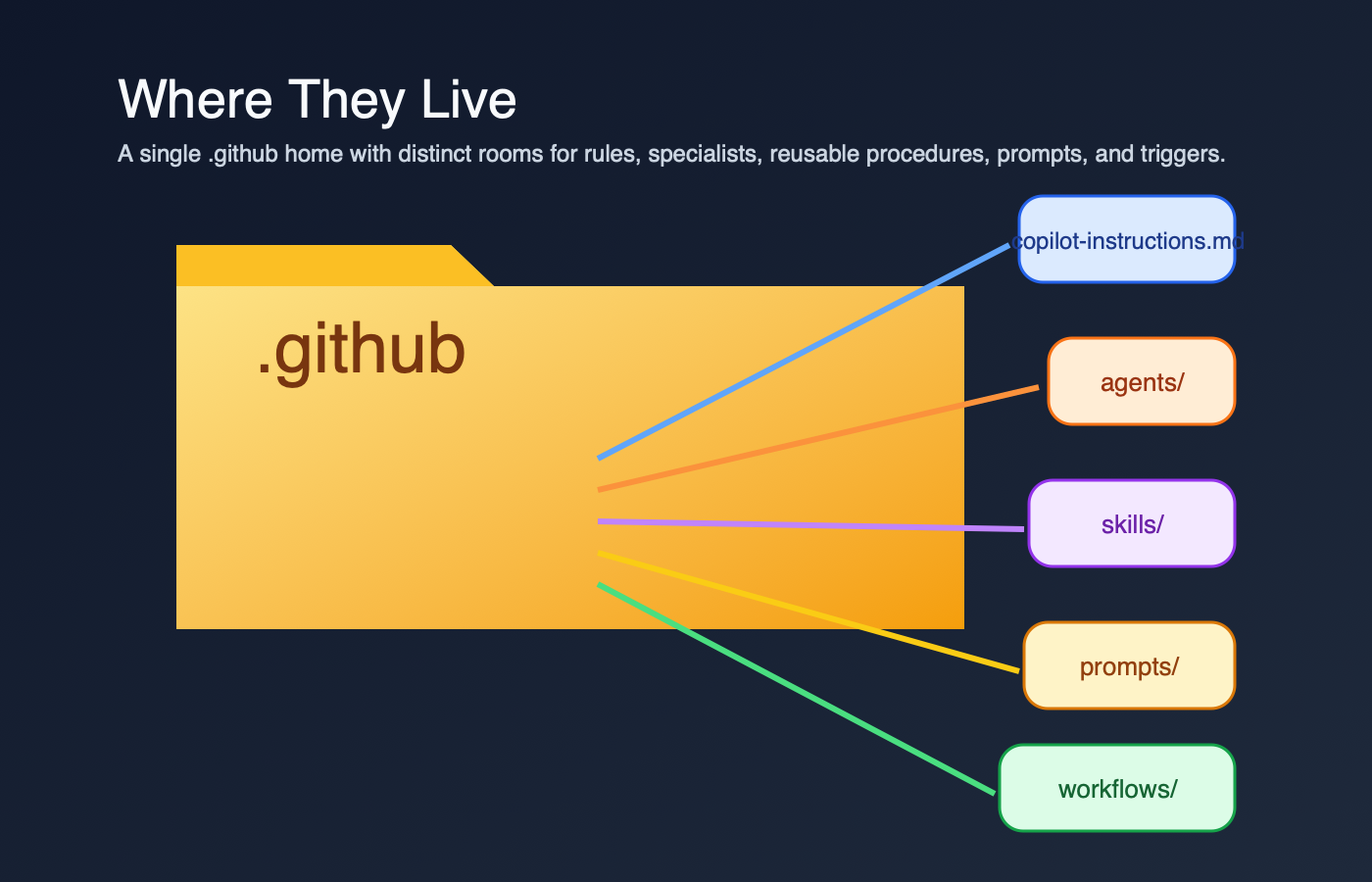
This structure diagram turns the six file families into one navigable map so you can see which pieces are baseline, specialized, reusable, or event-driven.

Stylized .github home showing where instructions, agents, skills, prompts, and workflows live

The folder-house metaphor emphasizes that these files live together, but each room has a different job.

Those are the most commonly confused files. There are also AGENTS.md (an OpenAI/Anthropic agent convention — not a GitHub Copilot feature), hooks, and MCP configs.

The Copilot Instructions File: Governance Layer

/.github/copilot-instructions.md is the ambient context that sits behind Copilot work in a repo. It's not something I invoke manually. It's the baseline.

What it contains:

  • Coding standards and conventions
  • Architecture guidelines
  • Documentation expectations
  • Review requirements
  • What "done" looks like
  • Security constraints
  • Naming conventions

Real examples:

Microsoft MCP Copilot Instructions — a focused baseline file. The heading is Coding Instructions for GitHub Copilot, not "Comprehensive Overview," and it goes straight into always-apply rules, build expectations, and PR guidance.

Azure SDK for JavaScript Copilot Instructions — a denser governance file. The Azure SDK guidance gets specific about API design, implementation choices, and when to explain a deviation from the house style. In my experience, this kind of baseline makes Copilot more likely to produce code aligned with review expectations.

When you use it in Copilot:

  • Open Copilot chat in the repo
  • Ask it to "write a PR description"
  • Copilot includes the repo instructions automatically

How long should it be? Short enough that a human can still scan it. MCP's file is compact. Azure's is more opinionated. If the instructions file starts reading like a runbook instead of repo policy, I move the task-specific detail somewhere else.

Key rule: Instructions describe outcomes and standards. They are the repo's rules of engagement, not the step-by-step workflow.

Path-Specific Instructions: Scoped Rules

I missed this feature entirely until I was reviewing a monorepo that had three different instruction files and I couldn't figure out why Copilot kept changing tone between the frontend and backend code. Turns out, Copilot supports path-specific instruction files in .github/instructions/ — and they're additive with the repo-wide file.

Format: {name}.instructions.md files inside .github/instructions/

Example structure:

.github/
copilot-instructions.md # repo-wide (always-on)
instructions/
frontend.instructions.md # applies to /frontend
backend.instructions.md # applies to /backend
tests.instructions.md # applies to test files

Each file uses YAML frontmatter with an applyTo key to declare which paths it covers:

---
applyTo: "src/frontend/**"
---
Use React functional components with TypeScript.
Prefer CSS modules over inline styles.

Key behavior: When I'm working in a file that matches a path-specific instruction, Copilot combines both the repo-wide instructions and the path-specific ones. It doesn't replace — it layers. This is different from how I initially assumed it worked.

When to use path-specific instructions instead of the repo-wide file:

  • Your monorepo has distinct language/framework areas with different conventions
  • Test files need different guidance than production code
  • API code has stricter rules than internal scripts

When NOT to use them:

  • Rules that apply everywhere (keep those in copilot-instructions.md)
  • Task-specific procedures (those belong in skills)
  • One-off guidance (just say it in chat)

Official docs: Adding path-specific custom instructions


Agent Definitions: Specialist Persona

.github/agents/ is where I expect to find specialist agents — focused reviewers or operators with their own scope, tool boundaries, and output format.

What an agent file contains:

  • What the agent specializes in
  • Which tools it can access
  • Task-specific constraints
  • Expected output format
  • When to use it over the default assistant

Real examples:

Azure SDK: archie.agent.md — architecture review specialist. The file defines the reviewer's purpose, allowed tools, scope, and output format. It also references ../prompts/architecture-review-guidelines.md to load its review guidelines.

Azure SDK: scribe.agent.md — documentation review specialist. Same pattern, different charter: README, CHANGELOG, snippets, samples, and TSDoc.

How to invoke it: The exact path depends on the surface. GitHub's customization cheat sheet is the clearest map I found: select the custom agent in the UI, use /agent in Copilot CLI, or reference the agent naturally in chat.

How it differs from instructions:

  • Instructions: Always-on, repo-wide governance
  • Agent: Specialized, on-demand, with its own boundaries

I don't need agents for every repo. A lot of projects are fine with instructions alone. But once I have a recurring task like architecture review or docs review, an agent gives that work a clear owner.


Skills: Reusable Procedures

A skill is a folder with a SKILL.md file plus whatever supporting templates, scripts, or resources the workflow needs. GitHub's docs describe skills as packages that Copilot can load when they're relevant to a task. That detail matters. A skill is not just a long prompt. It's a reusable procedure.

What a skill contains:

  • When to use the skill
  • What it does
  • Input requirements
  • Output expectations
  • Links to deeper references
  • Templates or helper assets
  • Scripts or automation, if the workflow needs them

Real examples:

OpenAI Agents Python: code-change-verification — a concrete verification skill. It tells Copilot when to run the verification stack and points to scripts that execute the checks.

Vercel Next.js: authoring-skills — a nice example of a skill that explains what belongs in a skill versus in AGENTS.md.

How it gets used:

  • In surfaces that support skills, Copilot may auto-load it when the task matches
  • You can ask for that workflow explicitly
  • A custom agent can rely on it as part of a larger procedure

Where they live:

  • .github/skills/ — the GitHub Copilot canonical path
  • .agents/skills/ — the cross-agent open standard path (used by OpenAI, Vercel, and others)

Skill vs. Agent vs. Instructions — the mental model:

GitHub's documentation describes what each feature does, but doesn't frame the relationship as explicitly as I'd like. Here's my mental model: Instructions set the rules. Agents decide. Skills execute. This is my interpretation, not GitHub's official framing, but it helps me remember which tool to reach for.


Skills vs. Prompts: The Critical Difference

This is the distinction that tripped me up most, because people use the word "prompt" to mean two different things.

AspectSkillPrompt file / prompt doc
What it isAgent-skill package with instructions, resources, and sometimes scriptsEither an official .prompt.md template or a repo-local markdown doc used as reference context
How it gets usedIn supported surfaces, Copilot may auto-load it when relevant, or you ask for it explicitlyOfficial prompt files are typically user-selected or referenced in supported IDEs; repo-local docs can also be linked from agents or workflows
What's insideSteps, commands, templates, helper assetsExamples, patterns, checklists, input variables, edge cases
CLI supportYesOfficial .prompt.md prompt files are IDE-focused, not Copilot CLI

The caveat that matters: Official GitHub prompt files use .prompt.md and are an IDE feature. Azure's .github/prompts/*.md files are different. They're repo-local reference docs that agents or workflows load, not the product feature GitHub documents as prompt files.

That means my old rule of thumb was too neat. Prompts are not always passive reference, and skills are not always the only place with step-by-step guidance. The better distinction is this: skills are packaged workflows Copilot can use as skills; prompt files and prompt docs are reusable context.

Decision tree for choosing between skills, official prompts, prompt docs, or no file

The decision tree compresses the distinction into one question sequence: reusable workflow first, reusable prompt second, reference doc third.


Prompts: Task-Specific Expertise

.github/prompts/ is where many repos store task-specific context. Sometimes those files are official GitHub prompt files ending in .prompt.md. Sometimes, and this is what Azure JS does, they are plain markdown docs that reviewers load as guidance.

What a prompt file or prompt doc contains:

  • Patterns and examples
  • Detailed guidance for a specific task
  • Decision rules
  • Known edge cases
  • Sometimes input placeholders if it's an official prompt file

Real examples:

Azure SDK: architecture-review-guidelines.md — a repo-local reference doc. It defines the review scope and checklist for architecture review, and Archie points to it directly.

GitHub gh-aw: create-agentic-workflow.md — another repo-local guide. It explains the markdown workflow structure used by gh-aw. Useful context, yes. An official GitHub prompt-file feature, no.

How agents use them: Agents or workflows can read these docs at runtime. In Azure JS, the architecture review guidance also points back to .github/copilot-instructions.md, which is a nice example of the layers staying connected instead of duplicating each other.

Where they live:

  • Official prompt files: .github/prompts/*.prompt.md
  • Repo-local reference docs: often .github/prompts/*.md
  • Organized by task: architecture review, dependency review, release prep, and so on

Why separate files? Because the detail belongs close to the task, not smeared across every Copilot interaction. When instructions become hard to scan, moving task-specific context into separate files keeps the baseline clean.


Workflows: Automation Triggers

.github/workflows/ is standard GitHub Actions. I include it here because people often blame Copilot for behavior that is really coming from a workflow trigger.

What a workflow does:

  • Listens for triggers such as push, label, schedule, or manual dispatch
  • Runs remote automation on GitHub
  • Starts a reviewer or other automation path
  • Posts status, comments, or checks back to the PR

Real example:

Azure SDK for JavaScript reviewer workflows — not one big controller that fans everything out. Each reviewer has its own workflow file. Archie and Dexter both trigger on pull_request_target with types: [labeled], and Dash says plainly that its job is to review a PR for performance regressions.

How it connects to agents and skills: The workflow is the remote trigger. In Azure JS, each reviewer workflow posts its own findings back to the PR. In other repos, a workflow might also call a custom agent or load a skill, but that's not the part I can prove from this example.


How They Wire Together: A Real Workflow

Here's the version of the Azure SDK flow I can actually defend with links.

1. A label triggers the run In Azure JS, the review workflows listen for pull_request_target with types: [labeled], not for PR creation. You can see that in archie.md and dexter.md.

2. Each reviewer has its own workflow Archie, Dash, Dexter, and Scribe are separate files under .github/workflows/. They can run independently when their trigger label appears. This is not one workflow spawning four reviewers in parallel.

3. The workflow itself states the review job Dash literally says it reviews the PR for performance regressions and anti-patterns. Archie and Dexter follow the same pattern for architecture and dependency review.

4. Agent files and prompt docs are the reusable layer Separately from the workflow trigger, archie.agent.md defines the architecture reviewer as a reusable custom agent and references ../prompts/architecture-review-guidelines.md. That prompt doc then points back to the repo instructions in architecture-review-guidelines.md.

5. Findings land on the PR from each workflow Archie and Scribe both declare create-pull-request-review-comment and submit-pull-request-review in safe-outputs, with run messages for the PR review lifecycle. So the accurate mental model is: each reviewer workflow posts its own findings. There isn't a separate "collector" workflow in this example.

6. Skills are adjacent, not proven by this example Skills still matter to the overall ecosystem, but Azure's review workflows are not the example I would use to claim that agents are invoking skills behind the scenes. If I want to show skills, I use an actual SKILL.md repo.


Using Copilot with These Files: Chat and CLI

In Copilot Chat (Browser or VS Code)

Scenario: You're in a repo and you open Copilot chat.

You: write a PR description

Copilot reads .github/copilot-instructions.md and picks up things like:

  • PR title format
  • Required sections
  • Review expectations

Result: the draft is much more likely to match the repo's stored rules.

Scenario 2: You want the specialist reviewer.

You: use the archie agent to review my API changes

Depending on the surface, you might select archie in the agent picker, use /agent in Copilot CLI, or reference it naturally in chat. The important part is the same: the agent file gives that review task its own scope and constraints.

In Copilot CLI

Scenario: You're working locally and you want a code review from the terminal.

copilot
/review focus on bugs and security issues in my current changes

GitHub documents /review as the CLI code review path in its Copilot CLI docs and agentic code review guide. This is the replacement for the old gh copilot pr-review mental model I had in my head.

Scenario 2: You want to trigger the remote GitHub Actions reviewer from your terminal.

gh workflow run archie.md -f item_number=42

That command is a remote workflow dispatch through GitHub CLI, not local Copilot behavior. Azure's reviewer workflows expose workflow_dispatch with an item_number input in archie.md, so gh can start the run on GitHub.


Decision Table: Which File for What?

Decision tree for placing work in instructions, agents, skills, prompts, or workflows

This placement tree turns the file choice into a routing problem: match the task shape, then drop it in the right folder.

I need to...Put it in...Why
Set coding standardsCopilot instructionsAlways-on, repo-wide governance
Require testing notes on all PRsCopilot instructionsIt's a rule, not a workflow
Automate PR review on labelsWorkflows + reviewer definitionsLabels are a GitHub Actions trigger, and the reviewer needs its own scope
Store detailed architecture patternsPrompt docsToo bulky for baseline instructions; reviewers can load them when needed
Make code generation or verification repeatableSkillsCopilot can load the packaged workflow when the task matches
Handle a one-time taskChatSome work doesn't need a file at all

Minimal Repo Setup

If I'm starting fresh and I don't want to overengineer this, I keep it boring.

Minimal viable setup:

  • .github/copilot-instructions.md (recommended baseline)
  • No agents yet unless I have a recurring specialist task
  • No skills yet unless I keep repeating the same workflow
  • No prompt docs yet unless the task-specific context is making the instructions file noisy

As the repo grows:

  • Add agents when a task needs its own tool restrictions or review charter
  • Add skills when a workflow deserves packaging
  • Add prompt docs when a reviewer or task needs deeper context than the baseline file should carry

Start minimal, then add layers only when each layer removes confusion.


How to Find Examples in Real Repos

Here are the examples I would study first.

Azure SDK for JavaScript — the clearest end-to-end example I found

Microsoft MCP — a readable baseline instructions file

GitHub gh-aw — a good example of repo-local workflow guidance that looks prompt-like

Vercel Next.js — useful for skill design patterns


The One-Sentence Rule

Woman viewing four landscape paintings on a wall — the same mountain at sunrise, noon, rain, and sunset — representing the config files seen from different angles

If I'm stuck deciding where something belongs, this is still the fastest check I know:

  • If it reads like a rule, put it in instructions.
  • If it reads like a reusable workflow, put it in a skill.
  • If it reads like task-specific context, put it in a prompt doc or prompt file.
  • If it has to run on GitHub events, put it in a workflow.