Many developers use multiple AI surfaces daily: GitHub Copilot in VS Code, Copilot CLI, Microsoft 365 Copilot, Microsoft Scout, Claude, ChatGPT, or Cursor.
The problem: each surface starts without the context you gave the last one. Preferences, current work, boundaries, and decisions stay trapped in whichever tool you told.
This post proposes a portable personal context source: structured markdown files in a GitHub repo that AI tools can read. No vendor supports this end-to-end today. The storage can be portable; the behavior is not automatic. Each surface still needs its own wiring.
The Problem: Context Islands

| Surface | What it knows about you | Where that knowledge lives |
|---|
| Copilot in VS Code | .github/copilot-instructions.md in current repo | Per-repo, per-machine |
| Copilot CLI | Local instructions, skills, plugins, MCP servers, and session data | CLI-specific local state |
| Microsoft 365 Copilot | Your M365 Graph data (emails, calendar) | Cloud, not exportable |
| Microsoft Scout | Memories, preferences, profile | Local app state |
| Claude | CLAUDE.md per project, memory | Per-project file + cloud memory |
| Cursor | Project Rules in .cursor/rules/*.mdc, plus AGENTS.md support | Per-project rules |
The pattern: each tool has its own user-context format. The result:
- Repeated preferences in every tool ("I prefer concise output," "use TypeScript," "don't auto-push to main")
- Decisions invisible outside the surface where they happened
- Expertise and boundaries known only where you stated them
You Already Know What the Solution Feels Like

| Built-in Feature | What it does | The problem |
|---|
| M365 Copilot: Custom instructions | "Be concise, use tables" | Doesn't reach VS Code or CLI |
| M365 Copilot: Work profile | Your role, org, skills | Locked in Microsoft Graph |
| M365 Copilot: Saved memories | Facts remembered between sessions | Only M365 Copilot sees them |
| ChatGPT: Memory | Auto-extracted facts about you | Only ChatGPT sees them |
| Claude: CLAUDE.md | Per-project instructions | Only Claude Code sees them |
| Cursor: Rules | Coding preferences | Only Cursor sees them |
Each tool stores personalization separately. Portable context makes the source shared:
Today:
M365 Copilot → knows you like concise output
VS Code Copilot → doesn't know (asks again)
Copilot CLI → doesn't know (asks again)
Scout → has its own separate copy
Claude → has its own separate copy
With portable personal context:
Wired surfaces → read from the same source → load your preferences
Why Not Just Use Those Existing Features?
| Built-in Personalization | Portable Context |
|---|
| Portability | One surface only | Shared source; manual wiring per surface |
| Transparency | Opaque ("View work data") | Human-readable markdown |
| Exportability | Can't export | git clone anywhere |
| Versioning | No history | Full git history |
| Control | Platform decides format | You decide format |
| Decisions | No structured log | Append-only ledger |
| Auto-extraction | Yes (convenient) | Manual (precise) |
Use built-in personalization where it exists; keep portable context as the canonical source you can inspect and version.
Why Not CLAUDE.md, copilot-instructions, or Cursor Rules?
Those files are instructions TO the AI for one project. Personal context is information ABOUT you across tools. Cursor's current model is Project Rules in .cursor/rules/*.mdc; .cursorrules is legacy.

.github/copilot-instructions.md → "In this repo, use ESM imports"
personal-context/process/... → "I always prefer ESM over CommonJS"
Repo-level files govern a codebase. Personal context governs how to work with you.
Why Not Just an Agent or Skill?
Agents and skills are task-scoped. Personal context is user-scoped.

| Personal Context | Agent (agent.md) | Skill (SKILL.md) |
|---|
| Answers | "Who is this person?" | "How should I behave?" | "How do I do this task?" |
| Scope | Everything you do | One role or surface | One repeatable procedure |
| Lifespan | Years (grows with you) | Months (evolves with tooling) | Weeks (refined per use) |
| Portability | Shared source across wired surfaces | One surface | Some surfaces |
Personal context should feed agents and skills, not duplicate them. Without it, agents start without your quality bar, boundaries, or past decisions.
Why Not Mem0 or a Cloud Memory Service?
Mem0 is a cloud API for persistent AI memory. It makes different tradeoffs:
| Mem0 (Cloud) | Personal Context Repo |
|---|
| Architecture | Hosted API service | Local-first (files in git) |
| Data ownership | Third-party hosted | You own it (your GitHub) |
| Works offline | No | Yes |
| Vendor dependency | Yes (Mem0 API key) | No (just git) |
| Human-readable | No (vector store) | Yes (markdown you can edit) |
| Versioned | No (mutable state) | Yes (git history + blame) |
| Semantic search | Yes (their strength) | No (not needed at personal scale) |
| Best for | App builders serving many users | Individual developers across their own tools |
For one developer, dozens of curated facts, decisions, and preferences may not need a hosted dependency.
Personal Context Is Not Memory

Key distinction: personal context is not memory. They overlap, but they need different storage, governance, and precedence rules.
Context is declared, curated, and authoritative. Memory is accumulated from use.
| Personal Context | Memory |
|---|
| Origin | Authored intentionally | Accumulated automatically |
| Nature | Curated / declared | Accreted / observed |
| Authority | Authoritative ("this is the rule") | Evidentiary ("this is what happened") |
| Example | "My branch naming convention is {type}/{id}-{slug}" | "Last Tuesday you renamed a branch to wip-2" |
| Volume | Small, deliberate (~50-150 facts) | High-volume, ever-growing |
| Governance | Human-reviewed | Auto-captured |
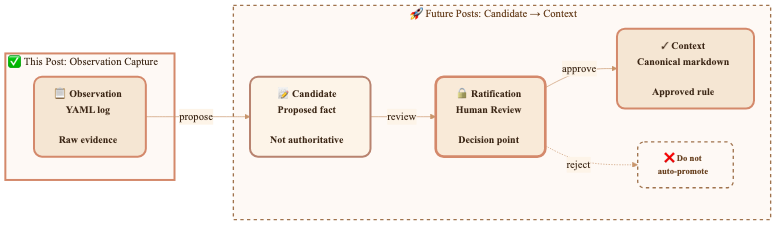
They are two ends of a promotion pipeline:
observation  →  candidate  →  [ratification gate]  →  context
 (memory)       (proposed)     (a human decision)      (canonical)
Memory is the raw feed. Context is the reviewed output. The ratification gate is the control point. The architecture changes:
- Stores. Memory wants a high-volume append log. Context wants a small, curated, versioned set.
- Precedence. Context outranks memory. A remembered exception does not override a stated boundary.
- Retrieval and governance. Context is load-always instruction; memory is search-when-relevant evidence.
This post is about context, not memory: authored, reviewed, and portable.
The Insight: LLMs Already Speak Markdown

AI tools read files. LLMs understand markdown. Developer tools commonly authenticate with GitHub.
A private GitHub repo with structured markdown files can be the shared context source.
Any surface that can read the repo can load the same context.
The Architecture: Personal Context as a Repo

github.com/<yourname>/personal-context  (placeholder private repo)
│
├── context.json              ← Manifest: what's here + retrieval rules
│
├── core/                     ← RARELY CHANGES (your "constitution")
│   ├── expertise.md          # What you know, your domain authority
│   ├── boundaries.md         # What stays human, what AI never does alone
│   ├── role.md               # Job, scope, organization
│   └── communication.md     # How you prefer to interact
│
├── decisions/                ← APPEND-ONLY (your "ledger")
│   ├── _active.md            # Decisions still governing current work
│   ├── 2026-07.md            # This month's new decisions
│   └── ...
│
├── process/                  ← STABLE (your "playbook")
│   ├── content-workflow.md   # How you create content
│   ├── code-workflow.md      # How you write and ship code
│   ├── quality-bar.md        # Definition of done per work type
│   └── tool-preferences.md  # Preferred tools and patterns
│
├── active/                   ← CHANGES OFTEN (your "whiteboard")
│   ├── projects.md           # Current active projects
│   ├── sprint-focus.md       # This sprint's commitments
│   └── parking-lot.md        # Deferred items
│
└── .github/
    └── copilot-instructions.md  # Tells Copilot how to USE this repo
Why Four Layers?
Separate by durability: how often it changes and who can change it.

| Layer | Half-life | Mutability | Example |
|---|
| Core | Months/years | Human-only | "I'm a senior developer on the Azure SDK docs team" |
| Decisions | Permanent (append-only) | Any surface proposes; append after human confirmation | "Use generation pipeline for MCP namespace files" |
| Process | Weeks/months | Propose via PR | "Branch naming: {type}/{id}-{slug}" |
| Active | Days/weeks | Any surface updates after pull-before-push | "Sprint focus: Ship auth-flow feature" |
What Goes in Each Layer
Core: Your Constitution
Rarely changing context: expertise, boundaries, communication preferences.
core/expertise.md — What you know:
## Domain Expertise
- Azure SDK documentation across JavaScript, Python, .NET, Java, Go, Rust
- AI developer tools (MCP servers, AI Toolkit, Copilot extensions)
- Content workflow automation and multi-agent orchestration
- Technical writing for developer audiences

## Not My Expertise (don't assume I know)
- Kubernetes operations / cluster management
- Frontend framework internals (React, Vue, etc.)
- ML model training / fine-tuning
core/boundaries.md — What stays human:
## What AI Should Never Do Autonomously
- Push code to upstream repositories (only to forks)
- Send emails, Teams messages, or any outbound communication
- Close or resolve work items without my confirmation
- Delete files, branches, or repos
- Make irreversible changes without showing me the plan first

## What AI Can Do Without Asking
- Read files, search code, explore repos
- Draft content for my review
- Run tests, linting, builds
- Create branches on my fork
- Propose edits (but not commit without confirmation)
Decisions: Your Ledger
Decisions can be proposed from any surface so settled questions stay settled after review.
decisions/_active.md — Still-relevant decisions:
### [2026-07-06] Branch naming convention
- **Context:** Inconsistent branch names across repos
- **Decision:** Always use `{type}/{work-item-id}-{brief-slug}`
- **Types:** feat, fix, docs, refactor, test

### [2026-06-15] Prefer tables over prose for comparisons
- **Context:** AI kept writing long paragraphs comparing options
- **Decision:** When comparing 3+ options, always use a table
- **Supersedes:** Nothing (new preference)

### [2026-05-28] No hand-written namespace files
- **Context:** Generated files were higher quality than hand-written
- **Decision:** All namespace articles must come from the generation pipeline
- **Implications:** Slower to ship, but deterministically correct
Process: Your Playbook
Work preferences. Update as workflow changes.
process/quality-bar.md:
## When Is a Pull Request Done?
- [ ] Work item linked with "Fixes AB#{id}"
- [ ] Meaningful title and description (not just commit messages)
- [ ] No unrelated changes (surgical edits only)
- [ ] CI passes
- [ ] Review comments addressed, not dismissed
- [ ] Staged preview links included for doc changes

## When Is an Article Done?
- [ ] Technically accurate (verified against product behavior)
- [ ] Code samples run without modification
- [ ] All links resolve (no 404s)
- [ ] Metadata correct (ms.topic, ms.date, ms.service)
- [ ] Reviewed by at least 1 peer
Active: Your Whiteboard
Current work state, writable by any surface.
active/sprint-focus.md:
## Sprint 14 (2026-07-01 → 2026-07-12)

### Committed
1. Ship MCP auth namespace docs (AB#4521)
2. Review 3 community PRs on azure-dev-docs
3. Update AI Toolkit quickstart for v0.9

### Stretch
- Prototype portable context layer (this project!)
How Surfaces Consume It
Selective Retrieval: Only Load What's Relevant
Do not load the whole repo. Use context.json to choose task-relevant files:
1. Read context.json (< 1KB, always cached)
2. ALWAYS load: core/boundaries.md + core/communication.md (~400 words)
3. Classify the current task → match to load_by_task
4. Load those 2-3 files (~500 words)
5. Load decisions/_active.md (~300 words)

Total: ~1,200 words ≈ 1,600 tokens

The Priority Stack
Resolve contradictions deterministically:
core/boundaries.md          ← ALWAYS wins. Non-negotiable.
decisions/_active.md        ← Settled questions. Don't re-ask.
process/*.md                ← How to do things. Follow unless overridden in-session.
active/*.md                 ← Informational state. Not authoritative.

Threat Model: Retrieval Is the Boundary
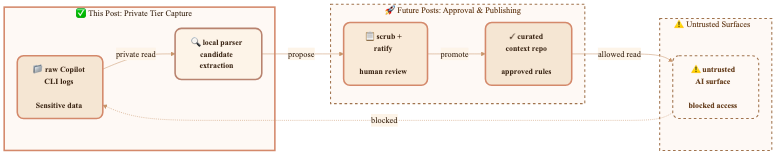
The primary risk is prompt injection causing a surface to retrieve or reveal context it should not have. Trust tiers must be enforced before retrieval, by deciding what files or slices enter the prompt. Output scanning is not a security boundary; use it only as defense in depth. Keep two boundary files if needed: shareable operating rules that most tools can load, and private sensitive constraints that only trusted surfaces can retrieve.
Writing Back: Closing the Loop
After human confirmation, any surface can write decisions back:
# After making a decision in any surface:
cd ~/personal-context
echo "
### [$(date +%Y-%m-%d)] {decision title}
- **Context:** {why this came up}
- **Decision:** {what was decided}
- **Implications:** {what this means going forward}
" >> decisions/_active.md

git add decisions/_active.md
git commit -m "decision: {brief title}"
git push
That simple append is safe only for a single writer with a fresh clone. Multi-surface writes need write intents with IDs and timestamps, pull-before-push, and PR-based reconciliation for stale updates or conflicts. The core layer stays human-only; non-active layers should go through review instead of direct overwrite.
Connecting Each Surface (Proposed Integrations)
Examples only. Some work manually; others need vendor support. The mechanism: read files and inject context.
GitHub Copilot in VS Code
In your user-level settings.json:
{
  "github.copilot.chat.codeGeneration.instructions": [
    { "file": "~/personal-context/core/boundaries.md" },
    { "file": "~/personal-context/core/communication.md" },
    { "file": "~/personal-context/decisions/_active.md" }
  ]
}
Or reference the repo in any project's custom instructions:
For my personal preferences and decisions, reference:
https://github.com/<yourname>/personal-context
Copilot CLI
Use the current standalone copilot CLI. Put durable CLI instructions in $HOME/.copilot/copilot-instructions.md, then point those instructions at the cloned context repo:
mkdir -p ~/.copilot
cat > ~/.copilot/copilot-instructions.md <<'EOF'
For personal preferences and decisions, read:
- ~/personal-context/core/communication.md
- ~/personal-context/core/boundaries.md
- ~/personal-context/decisions/_active.md

Treat the repo as reference context. Do not rewrite core files without human approval.
EOF
For richer integration, expose the same repo through an MCP server and register it with copilot mcp.
Microsoft Scout
Scout exposes settings for memory, personality presets, workspace, and permissions. Use those surfaces to mirror the same repo-backed preferences manually or through a sync process. A generated profile file can work as an implementation pattern, but the path below is illustrative, not a documented Scout contract:
# Sync script: pull personal-context → render an illustrative Scout profile
$role = Get-Content ~/personal-context/core/role.md -Raw
$comms = Get-Content ~/personal-context/core/communication.md -Raw
$boundaries = Get-Content ~/personal-context/core/boundaries.md -Raw

@"
# Personal Profile
$role

## Communication
$comms

## Boundaries
$boundaries
"@ | Set-Content ./scout-profile-example.md
Microsoft 365 Copilot
Sync the repo to a OneDrive folder:
OneDrive/personal-context/ → synced from GitHub repo
Expose the repo as an MCP resource server, or clone it locally and point the tool config to the files. MCP is the integration protocol for tools, resources, and prompts; use it to expose context as resources or tools where supported.
Getting Started: Example 30-Minute Setup

This is a rough first-pass estimate, not a guarantee. The ongoing cost is maintenance: review proposed changes, resolve conflicts, and prune stale active context.
1. Create the repo (5 minutes)
gh repo create personal-context --private
cd personal-context
mkdir -p core decisions process active .github
2. Write your identity (10 minutes)
Write what you would tell a new team member on day one.
3. Capture your first decisions (10 minutes)
Write five repeated preferences or decisions in decisions/_active.md.
4. Connect one surface (5 minutes)
Wire up VS Code settings, Scout profile, or a CLI alias. Verify it loads context.
5. Evolve naturally
When an AI asks something it should know, write it down, commit, and push.
The Payoff

| Before | After |
|---|
| "I prefer concise output" (every session) | A wired surface can load it from core/communication.md |
| "Use fork-first workflow" (every PR) | A wired surface can load it from process/code-workflow.md |
| "We decided to use the pipeline" (re-explained monthly) | A wired surface can load it from decisions/_active.md |
| "My sprint focus is X" (repeated across tools) | A wired surface can read active/sprint-focus.md |
| Start over in each new tool | Start from the same source after each tool is wired |
Likely payoff: fewer repeated preferences, fewer re-decisions, and faster starts. Keep time-saved claims only if measured.
Beyond the Repo: When a Service Makes Sense

The repo is the floor: markdown, git, no server, no vendor, no API key. Use a service only when a flat repo cannot enforce access. Git gives readers the whole file; a hosted service can return only authorized slices.
What a hosted version would buy you
- Server-side redaction by trust tier. Enforce
public / work / private tiers at the server. A flat repo cannot do that; clone access gets everything.
- Identity-based audit and access control. Log who read context, when, and from which surface.
- Central precedence. Resolve boundaries, decisions, process, and active state once instead of per surface.
The key design call: contract vs. transport
Do not make MCP the canonical contract. MCP is the integration protocol, not the canonical data model. Keep Git as the source of truth. If you build a service, make it a derived read facade over the repo, with a REST/OpenAPI contract and MCP exposed as a thin facade where clients support it.
Keep the contract you can't afford to rewrite in Git and REST; expose MCP as a facade you can afford to replace.
Version the REST facade carefully. Treat MCP adapters as replaceable.
What the service actually is: a context broker
The service has four jobs:
- Merge — combine the layers (core, decisions, process, active) into one view.
- Priority — apply the precedence stack so conflicts resolve deterministically.
- Redaction — return only the caller's trust tier.
- Defense-in-depth scanning — flag output that appears to reveal a tier the caller should not see.
The third job is the security boundary for prompt-injection exfiltration. With server-side redaction before retrieval, private context never enters the prompt for an untrusted caller. The fourth job can catch mistakes, but it cannot make unsafe retrieval safe.
Even a service still hits the standards wall
The limitation: even with a hosted service, consumption stays uneven:
| Surface | Talks to a remote MCP server? |
|---|
| VS Code / Copilot CLI / Foundry | Yes — directly |
| Claude / ChatGPT | Yes — directly where the surface, plan, and auth model allow remote MCP |
| Microsoft 365 Copilot | No — it wants Graph connectors / declarative agents |
The hosted version still needs a shared standard. For one developer, the repo is usually enough. A service earns its complexity only with multiple trust tiers, multiple consumers, or a real injection threat model.
What's Next: The Standard That Doesn't Exist Yet

This post is a proposal, not a product announcement. Today, none of this works automatically. Each tool reads its own context files, in its own format, from its own location. Vendors are adding memory, custom instructions, project files, and agent profiles, but not a shared context standard.
What's missing is a shared standard for where personal context lives and how to read/write it. The Model Context Protocol standardized tool integration; user identity needs the same kind of agreement. No shared standard exists today.
The GitHub repo approach is a bet: structured markdown plus a retrieval manifest could work if tool builders agreed to read it.
The ask to tool builders: Add an $AI_CONTEXT_PATH or equivalent. Let users point to markdown context. Portable context works when surfaces agree to read the repo.